
AI Can Answer IT Tickets. But Should It Be Allowed to Act?
AI-powered IT support has moved beyond answering employee questions and recommending solutions. Autonomous IT support can now diagnose incidents, execute approved remediation actions, update ITSM records, and resolve routine IT issues with minimal human involvement.
But this raises an important question for enterprise IT leaders: What happens when AI gets it wrong?
A wrong recommendation may cause confusion. An incorrect automated action could interrupt a service, change access permissions, or affect critical infrastructure.
That is why autonomous IT support must operate within defined security policies, permissions, approval processes, and verification mechanisms. Enterprise autonomy should not mean giving AI unrestricted access to IT systems. It should mean allowing AI to act within clearly defined boundaries.
Is Autonomous IT Support Safe?
Yes, autonomous IT support can be safe for enterprises when its actions are governed by risk-based policies, restricted permissions, human approvals, and continuous verification.
Organizations should decide which tasks AI can execute independently and which require human approval. Every action should also be recorded and traceable.
The goal is not to remove human oversight. It is to give AI the freedom to handle approved tasks while keeping people in control of high-impact decisions.
Key Article Takeaways
What Makes Autonomous IT Support Different?
Autonomous IT support goes beyond AI-assisted recommendations by allowing AI agents to execute approved IT actions. It can understand a request, diagnose an issue, perform remediation, verify the result, and update the ITSM system. The difference lies in who performs the action.
Traditional IT support depends mainly on human technicians. AI-assisted support helps technicians make decisions, while autonomous IT support allows AI agents to execute specific tasks within defined controls.
Traditional IT Support vs. AI-Assisted Support vs. Autonomous IT Support
| Activity | Traditional IT Support | AI-Assisted Support | Autonomous IT Support |
|---|---|---|---|
| Diagnose | Human | AI + human | AI |
| Recommend | Human | AI | AI |
| Execute | Human | Human | AI within defined controls |
| Verify | Human | Partial automation | Automated + governed |
| Escalate | Human | Human | Based on risk and policy |
For example, if an employee cannot access an application, an AI-assisted system may suggest troubleshooting steps. An autonomous IT support system can identify the issue, check access policies, perform an approved correction, verify access, and update the ticket.
However, autonomous IT does not mean AI handles every task independently. It means AI can execute approved actions while escalating sensitive or high-risk situations to human teams.
What Are the Risks of Autonomous IT Support?
The main risks of autonomous IT support come from incorrect decisions, excessive system permissions, uncontrolled infrastructure changes, and a lack of verification or auditability.
Without proper controls, an AI agent could perform an action that affects business operations or creates a security issue. Enterprises must understand these risks before allowing AI to execute IT tasks.
-
Incorrect Diagnosis and Remediation
AI agents may misunderstand an incident or work with incomplete information. If an agent identifies the wrong root cause, it may execute an unsuitable remediation action.
For example, restarting a service may appear to resolve an issue but could interrupt another dependent application.
-
Excessive System Permissions
An autonomous IT agent with unrestricted administrative access creates unnecessary security risks. If the agent makes an incorrect decision or its credentials are compromised, the impact could extend across multiple systems.
Enterprises should restrict access to only the systems, data, and actions required for the agent’s assigned tasks.
-
High-Impact Infrastructure Changes
Some IT actions can affect production environments, network security, and business-critical applications.
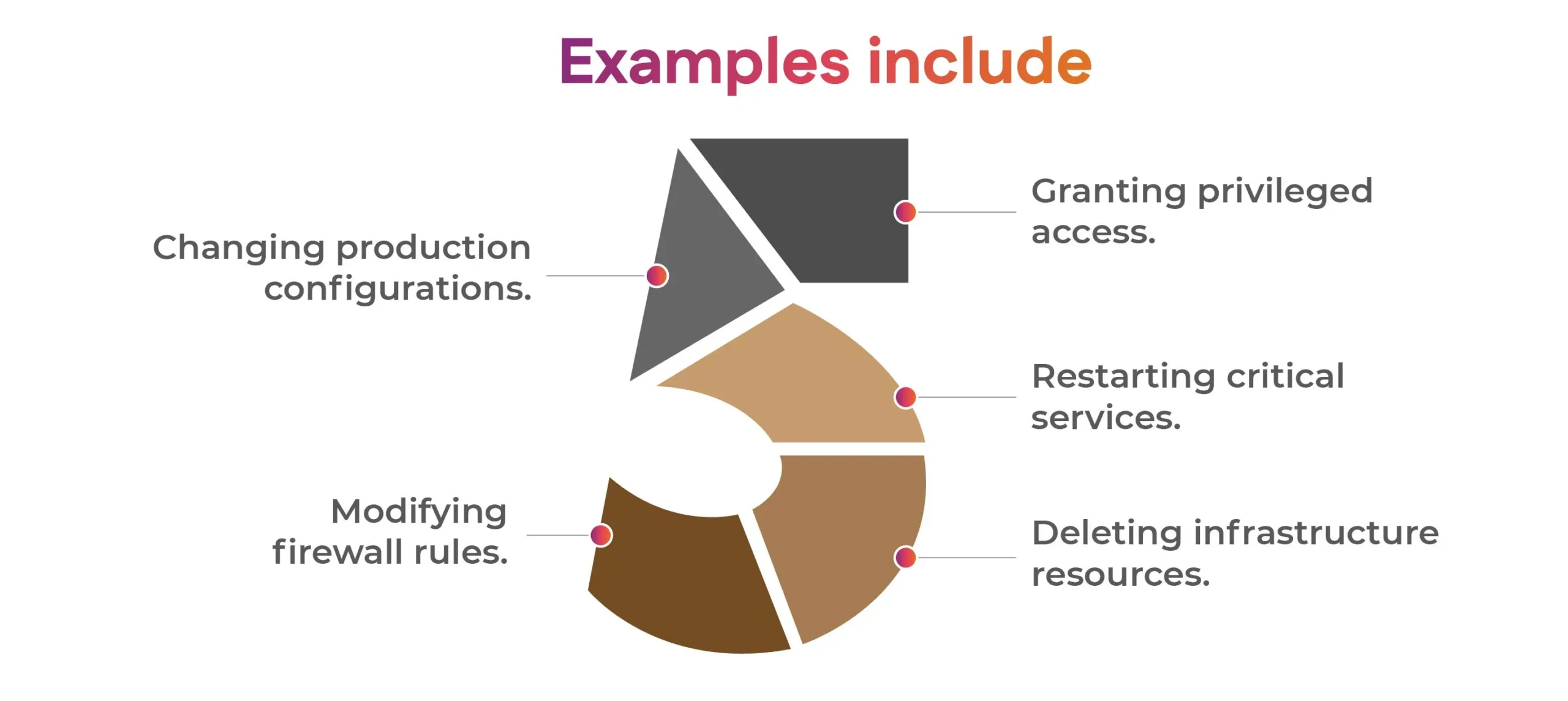
These actions should follow strict approval and execution policies.
-
Lack of Verification
Executing an action does not automatically mean an incident has been resolved.
For example, an AI agent may restart a service, but the application could remain unavailable. Without verification, the system might incorrectly mark the ticket as resolved.
-
Incomplete Auditability
Enterprises need to know what an AI agent did, why it performed the action, which policy allowed it, and what happened afterward.
Without detailed audit records, investigating errors, reviewing compliance, and improving automation become difficult.
7 Controls That Make Autonomous IT Support Safer
Enterprises can make autonomous IT support safer by implementing seven essential controls: risk-based autonomy, least-privilege access, policy-based execution, human approvals, rollback mechanisms, automated verification, and complete audit trails.
These controls help IT teams balance automation speed with security, governance, and operational accountability.
-
Implement Risk-Based Autonomy
Not every IT task carries the same level of risk. Enterprises should classify actions based on their potential impact and assign the right level of autonomy to each task.
For example, ticket classification and password resets may be suitable for independent execution when policy conditions are met. Production configuration changes may require human approval.
A risk-based approach helps organizations automate routine work without exposing critical systems to unnecessary risks.
-
Follow the Principle of Least Privilege
AI agents should receive only the permissions required to perform their assigned tasks. They should not have unrestricted administrative access across enterprise systems.
Organizations can apply least-privilege access through:
- Role-based access controls.
- Scoped permissions for specific tasks.
- Restricted and securely managed credentials.
- Access limited to approved systems and environments.
- Regular permission reviews.
This reduces the potential impact of incorrect actions or compromised credentials.
-
Use Policy-Based Execution
Policy-based execution defines what an AI agent can do, under which conditions, and when it must stop or seek approval.
For example, an agent may be allowed to reset an employee’s password after identity verification. However, granting privileged access may require an additional approval. Clear execution policies help ensure that every automated action follows organizational security requirements.
-
Require Human Approval for High-Risk Actions
Human-in-the-loop IT automation allows AI agents to handle approved tasks while involving people in sensitive decisions.
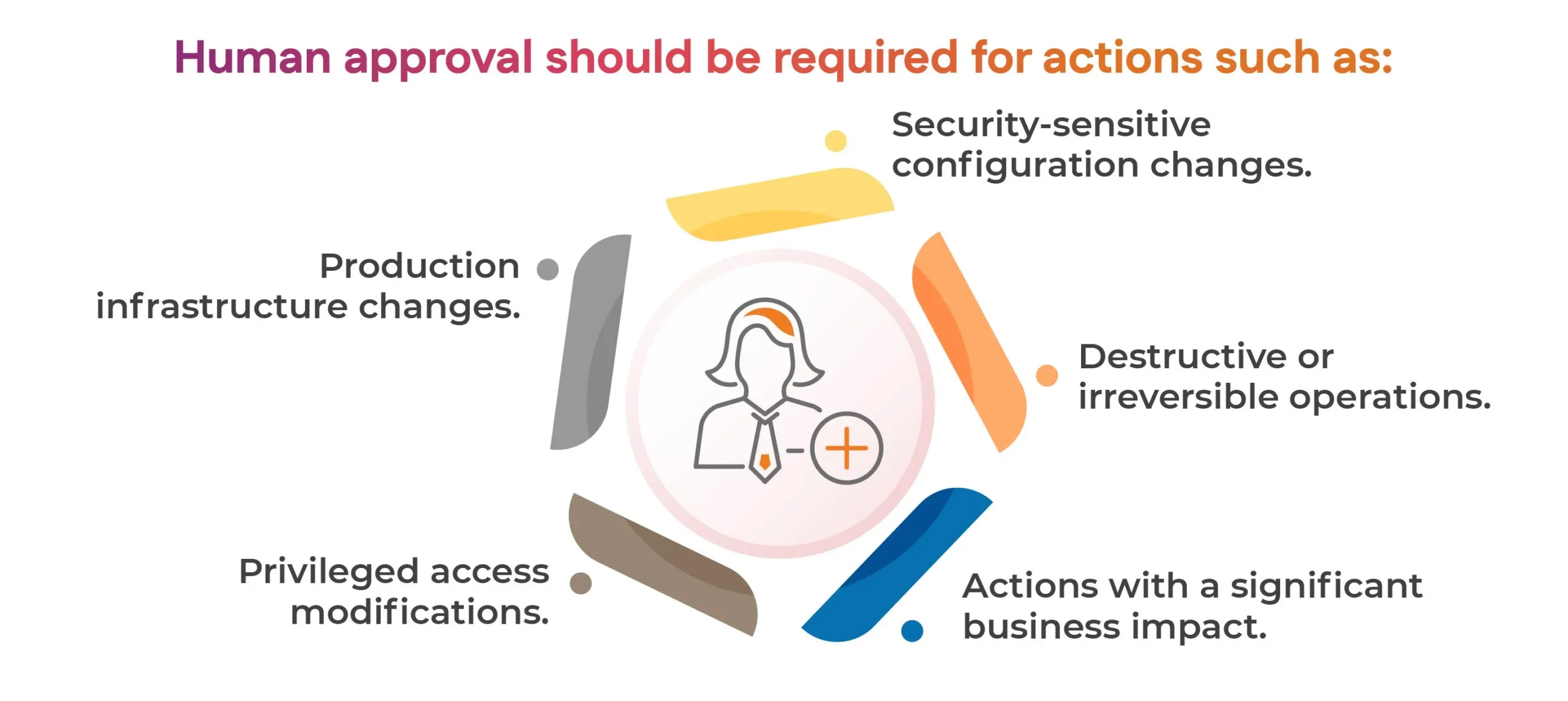
The objective is not to involve humans in every automated task. It is to ensure that people remain responsible for decisions where the consequences are significant. -
Build Rollback and Recovery Mechanisms
Autonomous IT support should have a recovery plan when an automated action fails or creates an unexpected result. Rollback mechanisms help restore systems to a previous stable state when supported by the underlying system and action.
For example, if an approved configuration change causes an application issue, the system should be able to trigger a defined recovery process or escalate the incident to an IT technician.
Recovery planning reduces the operational impact of unsuccessful automation.
-
Automate Verification After Every Action
Every automated remediation should be followed by verification. AI agents must confirm whether the intended result has actually been achieved before marking an incident as resolved.
A reliable process looks like this:

For example, after restarting a service, the agent should check service availability and confirm that the application is responding. If the issue continues, it should escalate the incident instead of closing the ticket.
Verification helps prevent false resolutions and improves IT support reliability.
-
Maintain Complete Audit Trails
Every autonomous action should create a traceable record. Audit trails help IT teams understand what happened, investigate unexpected outcomes, and demonstrate compliance.
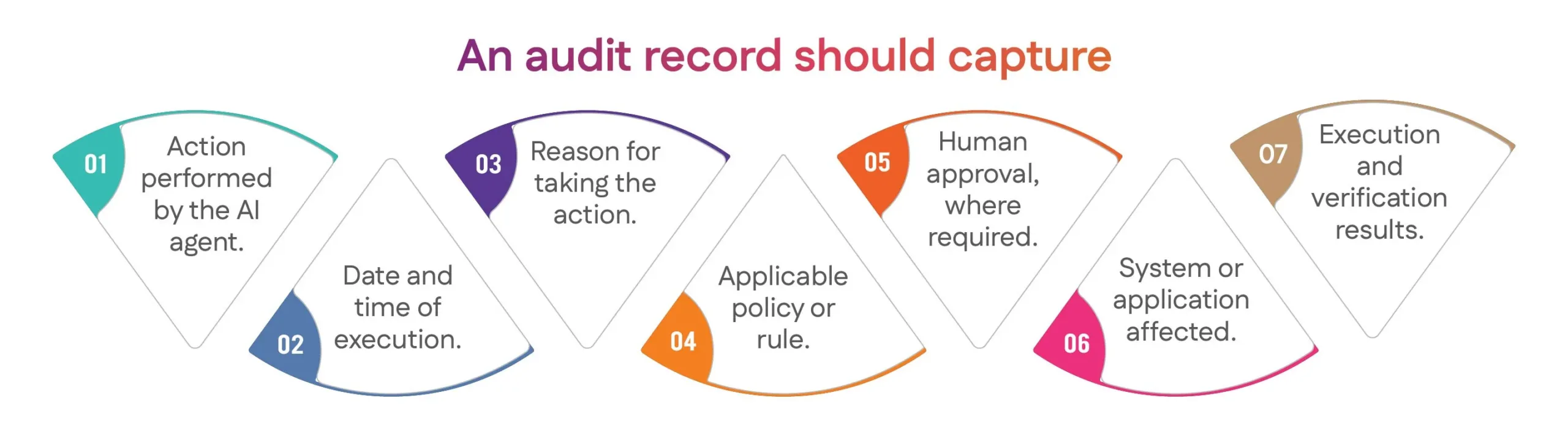
A complete audit trail makes autonomous IT operations more transparent and accountable.
Which IT Tasks Should Be Autonomous and Which Need Human Approval?
The right level of autonomy depends on the risk, business impact, and security requirements of each IT task. Routine and reversible activities can often be automated, while sensitive or destructive actions should have stronger approval requirements.
Here is an illustrative classification:
| IT Task | Recommended Autonomy Level | Reason |
|---|---|---|
| Password reset | Autonomous | Can be automated with identity verification and policy checks |
| Ticket classification | Autonomous | Routine, low-impact activity |
| Knowledge retrieval | Autonomous | Provides information without changing systems |
| Known incident remediation | Controlled autonomy | Requires predefined conditions and verification |
| Service restart | Controlled autonomy | Depends on service criticality and impact |
| Access provisioning | Policy-controlled | Must follow role and access policies |
| Production configuration change | Human approval | Can affect business-critical systems |
| Firewall modification | Human approval | May create security exposure |
| Destructive infrastructure action | Human-led | Potentially irreversible and high impact |
These examples are not universal rules. Every organization should classify IT tasks according to its infrastructure, security policies, compliance requirements, and risk tolerance.
The same task may require different approval levels depending on the environment. For instance, restarting a development service may be low risk, while restarting a critical production service may require approval.
How Autonomous IT Support Works With Your Existing ITSM
Autonomous IT support can work alongside existing ITSM platforms without replacing them. AI agents handle request understanding, diagnosis, approved actions, and verification, while the existing ITSM system continues to manage tickets and service records.
This approach allows enterprises to introduce autonomy without disrupting established IT service management processes.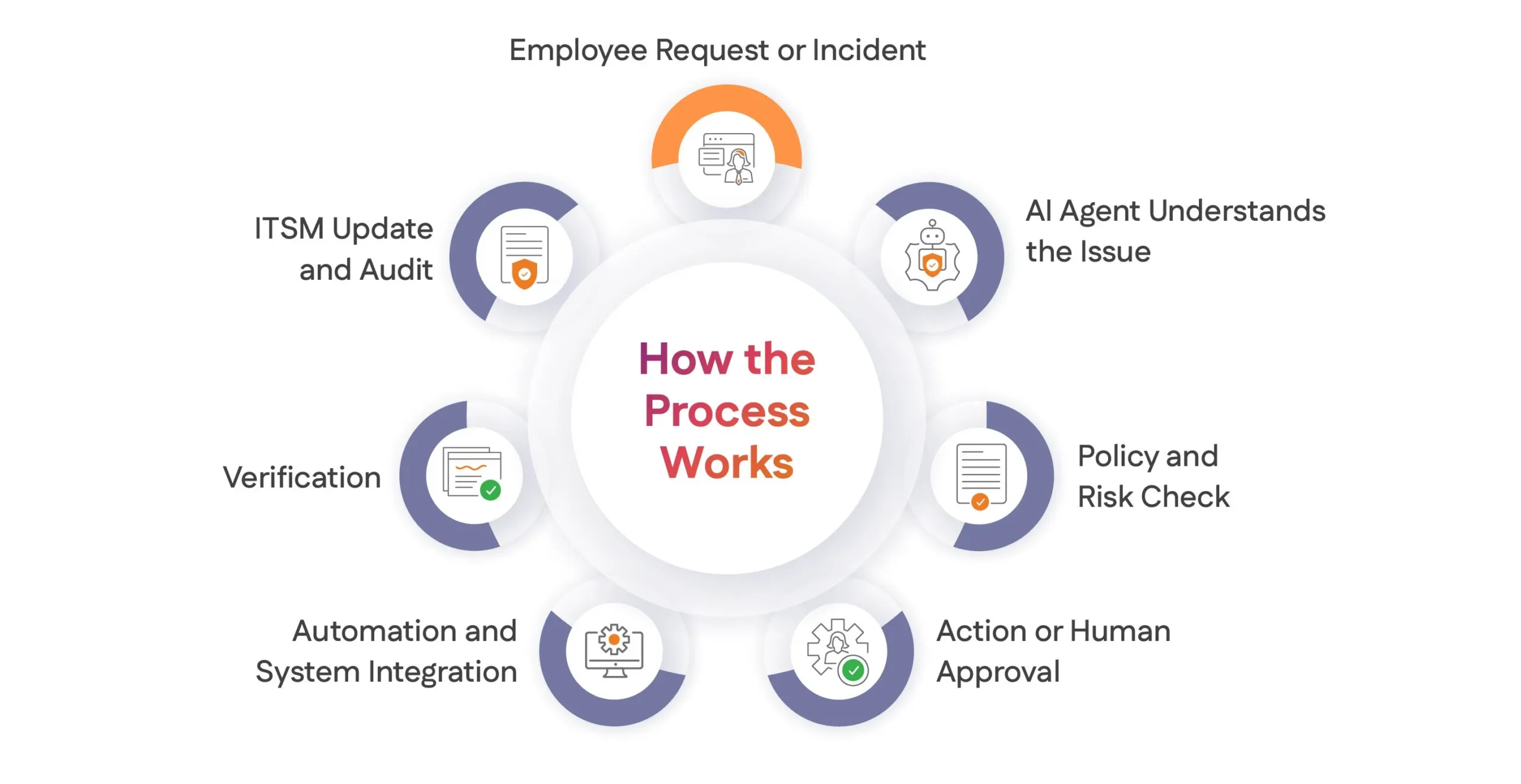
- Employee Request or Incident: An employee raises a request or an incident is detected through an existing monitoring system.
- AI Agent Understands the Issue: The agent interprets the request, gathers relevant information, and diagnoses the problem.
- Policy and Risk Check: The agent checks whether the required action is permitted and identifies its risk level.
- Action or Human Approval: The agent executes an approved action or sends the request for human approval.
- Automation and System Integration: The action is performed through connected applications, APIs, or enterprise automation.
- Verification: The agent checks whether the issue has been resolved successfully.
- ITSM Update and Audit: The system updates the ticket and records the action, approval, and outcome.
How SupportFlo Supports Governed Autonomous IT
SupportFlo brings together AI agents, enterprise automation, and cross-system orchestration to help IT teams move beyond AI-generated recommendations toward controlled action and resolution.
It works with existing ITSM platforms rather than requiring organizations to replace their current systems. Requests, incidents, and resolution details can be connected with existing IT workflows.
Its governance capabilities include policy-based execution, risk controls, approval workflows, and auditability. Policy Guard supports defined safety controls, including approval requirements, execution limits, and rollback mechanisms. SupportFlo also supports integration with enterprise applications and legacy environments, helping organizations connect automated actions with their existing IT infrastructure.
This gives IT teams a way to introduce autonomous resolution while maintaining control over how actions are performed.
How Should Enterprises Evaluate an Autonomous IT Support Platform?
An enterprise autonomous IT support platform should offer more than AI-driven diagnosis and remediation. It should provide security controls, execution policies, human approvals, verification, auditability, and integration with existing IT systems.
Before selecting a platform, IT leaders should evaluate the following capabilities.
Autonomous IT Support Evaluation Checklist
- Can administrators define which actions AI agents are allowed to perform?
- Does the platform support risk-based autonomy?
- Can access permissions be restricted using least-privilege principles?
- Can high-risk actions require human approval?
- Does it support rollback and recovery mechanisms?
- Can it verify whether an incident is actually resolved?
- Does it maintain complete audit trails?
- Can administrators control the impact or scope of automated actions?
- Does it integrate with existing ITSM platforms?
- Can it work with legacy applications and systems without APIs?
- Does it support gradual implementation and controlled rollouts?
A platform should make it possible to introduce autonomy at a pace that matches the organization’s security and operational readiness.
Move Toward Autonomous IT Without Giving AI the Keys to Everything
Autonomous IT support does not have to mean giving AI unrestricted control over enterprise systems. It means allowing AI agents to perform approved tasks while keeping sensitive decisions, permissions, and business-critical actions under control. The right approach combines risk-based autonomy, least-privilege access, policy enforcement, human approvals, automated verification, and complete auditability.
With SupportFlo, enterprises can move from AI-assisted IT support toward governed autonomous request and incident resolution. It brings together AI agents, enterprise automation, and cross-system orchestration while working with existing ITSM environments. IT teams can begin with defined use cases, establish execution policies, and expand automation as they build confidence in the process.